vID Lifecycle Reference
Audience: CRA operations teams and integration developers. Purpose: Define the Invite and Order objects, the statuses and scores each carries, and what to expect at every stage
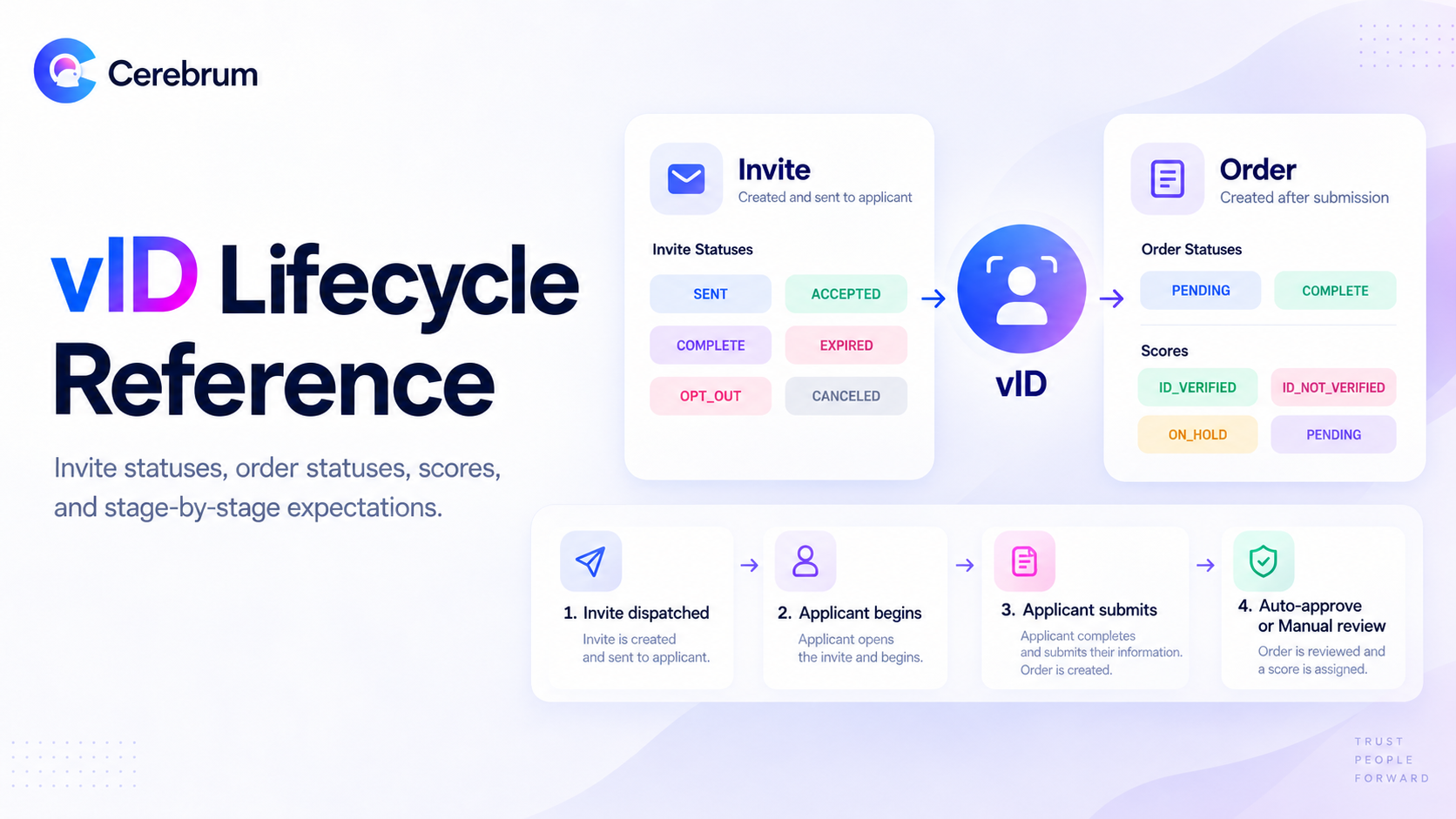
Two objects, not one
The most common source of confusion in vID integrations is treating the invitation and the resulting order as a single record. They are distinct objects with separate identifiers and separate status values.
Invite | Order | |
|---|---|---|
Identifier prefix |
|
|
Created when | You dispatch a verification request to an applicant | The applicant submits their verification |
Represents | The request | The result |
Exists without the other? | Yes — an invite exists from dispatch onward, whether or not the applicant ever submits | No — an order only exists once a submission is made |
An invite that has been sent but not acted on has no associated order. Querying for an order at that point will not return one, and this is expected behavior rather than a fault.
Invite statuses
Status | Meaning |
|---|---|
| The invitation has been dispatched. The applicant has not yet begun. |
| The applicant has opened the invitation, created their credentials, and started the flow. No order exists yet. |
| The applicant has submitted their verification. An order now exists. |
| The invitation was canceled before completion. |
| The applicant declined to proceed. |
| The invitation lapsed before the applicant completed it. |
Order statuses
Status | Meaning |
|---|---|
| The submission did not clear auto-approve and is awaiting CRA review. |
| The order is finalized, either by auto-approve or by a CRA reviewer. |
Order status is deliberately narrow. In practice, you will see only these two values.
Scores
The score carries the verification outcome and is independent of order status.
Score | Meaning |
|---|---|
| The order is complete, and all verification checks passed. |
| The order is complete, but alerts exist on the biometric and/or ID verification checks. |
| A reorder has been issued. The score holds here until the applicant's replacement submission arrives. |
| The submission is in manual review, and no determination has been made. |
ID_VERIFIED and ID_NOT_VERIFIED on a manually reviewed order is assigned by a CRA reviewer, not by Cerebrum. See Decision Ownership in the vID Workflow.
Stage-by-stage expectations
This is the reference table to build your integration logic against.
Stage | Invite status | Order exists? | Order status | Score |
|---|---|---|---|---|
Invitation dispatched |
| No | — | — |
Applicant opens invite and begins the flow |
| No | — | — |
Applicant submits, clears auto-approve |
| Yes |
|
|
Applicant submits, does not clear auto-approve |
| Yes |
|
|
CRA reviewer accepts the submission |
| Yes |
|
|
CRA reviewer rejects the submission |
| Yes |
|
|
CRA issues a reorder |
| Yes |
|
|
Invitation lapses before submission |
| No | — | — |
Applicant opts out |
| No | — | — |
A note on the failure path
When a submission does not clear auto-approve, the order is created directly in PENDING. Because it never held another status, no status change occurs — integrations relying solely on status-change events will see a score event without a corresponding status event on this path. Build your handling around the order's state rather than around receiving a status transition.
Auto-approve
Auto-approve is the default behavior and determines whether an order completes without human review.
A submission auto-approves when all of the following are true:
Biometric verification passes
The ID scan passes all configured verification checks
No alerts are raised by IP address checks
A submission routes to manual review when any of the following occur:
Biometric verification fails
Any ID verification check raises an alert
An IP address check raises an alert
A name variation is flagged
The applicant entered ID data manually after two failed scan attempts
The ID has expired
Additional scenarios are documented at docs.cerebrum.com/docs/failure-scenarios.
Auto-approve criteria are configurable at both the account and package level. Check depth and strictness, IP address checks, and name variation checks can each be tuned. Contact your Cerebrum representative to adjust them.
Manual entry after two failed scans
If an applicant's ID cannot be read after two scan attempts, they are routed to manual data entry rather than being blocked. This is intentional: it prevents applicants from becoming stranded, and it preserves the order so your team can decide how to proceed.
Any order completed through manual entry is routed to manual review by design, since the automated checks could not run against extracted document data.
Invitations
Expiry. Invitations expire if not completed within the configured window. The default is 30 days. This is adjustable at the package level via the Expiration Time setting — contact your Cerebrum representative to change it for your account.
ID Expiry Settings. A separate package setting from Expiration Time. This governs how long the verification record remains valid. The default is the ID's expiration date.
Reissuing an expired invitation. CRAs can self-serve reissue from Cognition
Resubmission links. A reorder generates a new verification link for the applicant. It is a fresh verification request, not a special link type — the applicant completes the same flow. Reorders are initiated by the CRA using Send Reorder Invite at the top of the order in Cortex.
Static links. In addition to per-applicant invitations, a package can expose a persistent verification link at an organization-specific address in the form yourorganization.vid.page. This is useful where verification is offered outside a per-order workflow. Contact your Cerebrum representative to have one enabled.
Webhooks
Webhook events allow your systems to react to invite and order state changes without polling.
Currently emitted invite events include:
Event | Fires when |
|---|---|
| The invitation is completed by the applicant |
| The invitation lapses |
| The applicant opts out |
Order status and score changes emit their own events. For the authoritative and current event list, payload schemas, and signing secret configuration, refer to docs.cerebrum.com/reference. Webhook coverage is expanding, so treat the API reference as the source of truth over any static document.
Webhook configuration and signing secrets are managed at the CRA organization level. A webhook endpoint configured at the CRA level receives events for orders placed under child organizations.
For testing without live submissions, use the webhook simulation endpoint documented at docs.cerebrum.com/reference/simulatewebhook.
Applicant experience notes
Language support. The applicant flow supports English, Spanish, French, Russian, and Hindi. Language is selected from the applicant's device settings and is currently available through the mobile application experience. Additional languages can be added on request.
Device requirements. The flow requires a working camera. Applicants attempting verification on a device with a non-functioning camera, or on a corporate network, may encounter capture failures or IP address alerts — see the vID Alert-to-Action Matrix.
Authentication. Applicants create credentials to access the verification flow. Authentication can be bypassed as a package setting. Contact your Cerebrum Support representative to enable it for a client.
Field names, event names, and endpoint paths in this document are provided for orientation. Always validate against docs.cerebrum.com/reference before implementing.
Was this helpful?